Lately I have been playing around with CAPI a lot more. I have used it many times before from an end-user perspective, but I had no experience operating a CAPI based setup myself. For a personal project I’m currently working on I need to manage multiple Kubernetes clusters across different regions, so I thought I’d give CAPI a shot. People who know me know that I am a huge fan of Talos Linux, ever since I came across the project in 2020 I haven’t stopped talking about it. Talos is a minimal OS built specifically for Kubernetes. The entire machine is configured declaratively and managed through a gRPC API. No SSH, no shell, no imperative drift. You define the desired state, Talos converges to it, and the result is deterministic every time. That model makes the OS disappear into the infrastructure instead of being something you manage alongside it. Naturally, I wanted to explore how CAPI and Talos fit together, and whether the combination can bootstrap a fully private cluster. This post covers what I found and how I got a private Talos-based Kubernetes cluster running on Hetzner Cloud.
What I’m Building
A Kubernetes cluster on Hetzner Cloud where every node sits on a private network (172.16.0.0/16, subnet 172.16.1.0/24) with no public IPs. A small NAT gateway VM handles egress to the internet via iptables MASQUERADE. The management cluster runs locally in Docker and reaches the private Talos nodes through a NetBird WireGuard mesh. The control plane endpoint is a VIP (172.16.1.10) assigned by Talos etcd leader election. Hetzner assigns every private IP as a /32, so each server’s kernel thinks it’s alone on the network.
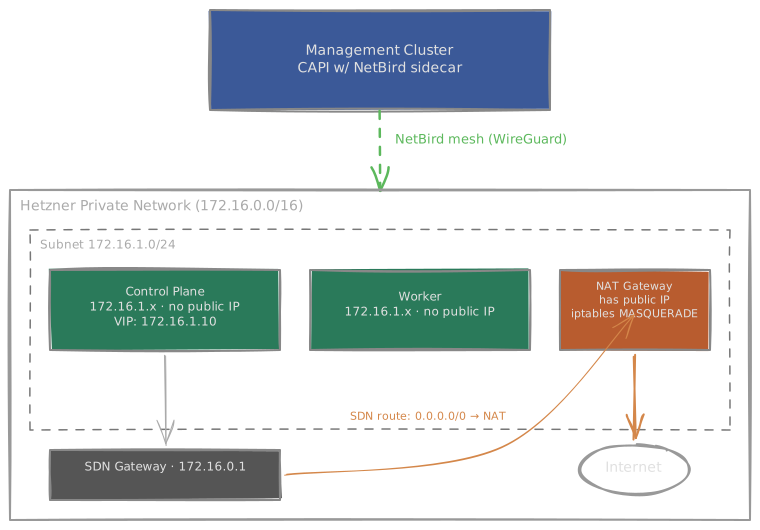
I’ll explain all of these pieces along the way.
CAPI and the Management Cluster
Cluster API (CAPI) manages Kubernetes clusters the same way Kubernetes manages pods: declaratively. You run a “management cluster” that hosts CAPI controllers. These controllers watch custom resources like Cluster, Machine, and MachineDeployment, and reconcile them against reality. Want three control plane nodes? Set replicas: 3. Want to upgrade Kubernetes? Change the version string. CAPI handles the rolling update, draining nodes, waiting for health checks.
CAPI is split into providers:
- Core provider: the Cluster and Machine controllers
- Infrastructure provider: talks to the cloud API to create VMs, networks, load balancers. For Hetzner, this is CAPH.
- Bootstrap provider: generates the machine configuration that gets applied at first boot. For Talos, this is CABPT.
- Control plane provider: manages the control plane lifecycle: scaling, upgrades, etcd membership. For Talos, this is CACPPT.
So first I need a seed/management cluster. Just to quicky try this setup it’s totally fine to create a local cluster. Since I’m already in the Talos realm, I will do that by creating a Talos cluster in Docker.
talosctl cluster create dockerThis will create a control-plane and a worker
kubectl get nodes
NAME                           STATUS   ROLES           AGE     VERSION
talos-default-controlplane-1   Ready    control-plane   2m34s   v1.35.2
talos-default-worker-1 Ready <none> 2m34s v1.35.2Note: Cluster API allows you to move Cluster API objects from one cluster to another. This could be useful if you are starting out with a local cluster for example, or you would have to migrate your management cluster.
With the cluster running, install the CAPI providers:
# Install clusterctl
curl -L https://github.com/kubernetes-sigs/cluster-api/releases/latest/download/clusterctl-linux-amd64 -o clusterctl
chmod +x clusterctl && sudo mv clusterctl /usr/local/bin/

# Initialize providers
clusterctl init \
  --infrastructure hetzner \
  --bootstrap talos \
  --control-plane talos
Wait for all pods in caph-system, cabpt-system, and cacppt-system to be running:
kubectl get pods -A | grep -E "caph|cabpt|cacppt"The Talos Image
CAPI’s bootstrap provider generates a Talos machine configuration and passes it as user-data. The node boots with that config and everything is deterministic from there. If a node is faulty, you replace it.
Talos uses Image Factory to build custom OS images with specific extensions baked in. I need NetBird (for mesh connectivity) and QEMU guest agent (for Hetzner to report VM status). The schematic ID encodes this combination:
bbfcb7053b1609712a977830952455432825890922cb6bac23cea34b980970f1Now, CAPH has two ways to provision an OS image onto a server: imageURL (download and write at boot) and imageName (boot from a pre-uploaded snapshot). I naturally tried imageURL first. Point it at the factory image URL and let CAPH handle the rest. CAPH created the servers, then immediately failed:
EnableRescue failed: no public network interfaces found,
rescue system cannot be used (private_net_only_server)
imageURL works by booting into Hetzner’s rescue system, which then downloads and writes the image. Rescue mode requires a public IP. On private-only servers, it’s a dead end.
So the path is pre-uploading the image as a Hetzner snapshot. The hcloud-upload-image tool handles this. Grab the binary from the releases page:
# Download hcloud-upload-image
curl -L https://github.com/apricote/hcloud-upload-image/releases/latest/download/hcloud-upload-image_linux_amd64.tar.gz \
  | tar xz -C /usr/local/bin hcloud-upload-image
Then upload:
hcloud-upload-image upload \
  --image-url "https://factory.talos.dev/image/bbfcb7053b1609712a977830952455432825890922cb6bac23cea34b980970f1/v1.13.0/hcloud-amd64.raw.xz" \
  --architecture x86 \
  --compression xz \
  --description "talos-v1.13.0" \
  --labels "talos=v1.13.0" \
  --location fsn1
The --labels flag is important: CAPH’s imageName field can resolve images either by literal name or by label. Using a label like "talos=v1.13.0" makes it easy to rotate images without changing the manifest.
Connecting the Management Cluster to Private Nodes
The CAPI controllers need to reach the private Talos nodes. CACPPT talks to the Talos API on port 50000 to orchestrate bootstrapping, upgrades, and scaling, while CAPI core and CAPH need the Kubernetes API on port 6443. On public nodes that’s trivial. Private nodes with no public IP need another path in.
NetBird is a WireGuard-based mesh VPN. Each peer gets a 100.108.x.x address and can reach any other peer in the mesh, regardless of NAT, firewalls, or network topology. The Talos nodes run the NetBird extension (baked into the OS image), and the CAPI controller pods each get a NetBird sidecar. Both sides join the mesh, and suddenly the management cluster can reach private Talos nodes.
I found the NetBird Kubernetes Operator, which handles all of this through a mutating webhook. You define a SidecarProfile CRD, and the operator injects the NetBird sidecar automatically into matching pods.
Install the operator:
helm repo add netbirdio https://netbirdio.github.io/helms
kubectl create namespace netbird

# The operator needs a NetBird management API token
kubectl -n netbird create secret generic netbird-mgmt-api-key \
  --from-literal=NB_API_KEY=<your-netbird-api-token>

helm install netbird-operator netbirdio/kubernetes-operator -n netbird
Then for each CAPI controller namespace, create a SetupKey and a SidecarProfile. The SetupKey CRD tells the operator to create a setup key via the NetBird API with the right group assignment. The SidecarProfile tells the webhook which pods to inject:
apiVersion: netbird.io/v1alpha1
kind: SetupKey
metadata:
  name: capi-mgmt
  namespace: cacppt-system
spec:
  name: capi-mgmt-cacppt
  ephemeral: true
  autoGroups:
    - name: capi-mgmt
---
apiVersion: netbird.io/v1alpha1
kind: SidecarProfile
metadata:
  name: capi-mgmt
  namespace: cacppt-system
spec:
  setupKeyRef:
    name: capi-mgmt
  podSelector:
    matchLabels:
      control-plane: controller-manager
Repeat for capi-system and caph-system. One gotcha: CAPH uses the label control-plane: caph-controller-manager instead of control-plane: controller-manager, so adjust the podSelector accordingly.
After applying, restart the deployments so the webhook injects the sidecar:
kubectl rollout restart deployment -n cacppt-system cacppt-controller-manager
kubectl rollout restart deployment -n capi-system capi-controller-manager
kubectl rollout restart deployment -n caph-system caph-controller-manager
All pods should come up 2/2 (manager + injected netbird sidecar). Verify:
kubectl exec -n cacppt-system deploy/cacppt-controller-manager \
  -c netbird -- netbird status
You should see Management: Connected and peers connected.
The nice thing about this setup: setup keys are managed by the operator via the NetBird API (no manual secrets), group assignment is automatic, and the sidecar survives clusterctl upgrade because it’s injected by the webhook at pod creation time, not baked into the deployment spec.
Then in the NetBird dashboard, configure a network route for 172.16.1.0/24. Routing peers should be a group containing the Talos nodes. Distribution group should include the capi-mgmt group.
Deploying the Cluster
Set the environment variables:
export CLUSTER_NAME=hetzner-test
export NAMESPACE=workload-cluster
export CONTROL_PLANE_MACHINE_COUNT=1
export WORKER_MACHINE_COUNT=1
export HCLOUD_REGION=fsn1
export HCLOUD_NETWORK_ZONE=eu-central
export HCLOUD_CONTROL_PLANE_MACHINE_TYPE=cpx32
export HCLOUD_WORKER_MACHINE_TYPE=cpx22
export CLUSTER_CTRLENDPOINT_VIP=172.16.1.10
export CLUSTER_CTRLENDPOINT_PORT=6443
export HCLOUD_SUBNET_GATEWAY=172.16.0.1
export HCLOUD_IMAGE_NAME="talos=v1.13.0"
export NETBIRD_SETUP_KEY=<your-netbird-setup-key>
export HCLOUD_TOKEN=<your-hcloud-token>
Create the namespace and apply:
kubectl create namespace workload-cluster
cat talos-hetzner.yaml | envsubst | kubectl apply -f -
CAPH immediately creates the private network and starts provisioning VMs. But the nodes need internet access to pull container images, and they have no public IPs.
CAPH doesn’t support referencing an existing network (discussion #1299), so you can’t pre-create the network with a NAT gateway already attached. It also deletes the network when you delete the cluster. You have to race: apply the manifest, then immediately create the NAT gateway on the CAPH-created network. In practice it works because Talos retries network operations on boot.
# Create the NAT gateway VM on the CAPH-created network
hcloud server create \
  --name nat-gateway \
  --type cpx22 \
  --image ubuntu-24.04 \
  --location fsn1 \
  --network ${CLUSTER_NAME} \
  --user-data-from-file nat-gateway-userdata.yaml

# Get the private IP assigned to the NAT gateway
NAT_IP=$(hcloud server describe nat-gateway -o format='{{(index .PrivateNet 0).IP}}')
echo "NAT gateway IP: ${NAT_IP}"

# Add the default route at the SDN level
hcloud network add-route ${CLUSTER_NAME} --destination 0.0.0.0/0 --gateway ${NAT_IP}
The nat-gateway-userdata.yaml is refreshingly simple:
#cloud-config
write_files:
  - path: /etc/networkd-dispatcher/routable.d/10-eth0-post-up
    content: |
      #!/bin/bash
      echo 1 > /proc/sys/net/ipv4/ip_forward
      iptables -t nat -A POSTROUTING -s '172.16.1.0/24' -o eth0 -j MASQUERADE
    permissions: '0755'

runcmd:
  - reboot
Enable IP forwarding, MASQUERADE traffic from the private subnet out through eth0. Reboot to ensure the networkd-dispatcher script runs on interface up. That’s the entire NAT gateway.
The /32 Problem
Servers booted. Talos started. But nothing could reach the internet. The Talos dashboard showed GW: n/a. The NAT gateway was sitting right there on the same network, correctly configured. Zero packets hit the NAT rules.
Hetzner Cloud Networks are L3-only. There is no shared broadcast domain, no ARP between peers, no Layer 2 at all. Every packet is routed by an SDN gateway sitting at the first IP of the network range (in this case 172.16.0.1). Servers don’t talk to each other directly; everything goes through that gateway. The /32 netmask is how Hetzner tells the kernel: “you have no neighbors on this link, route everything via the gateway.”
AWS VPCs, GCP VPCs, and Azure VNets work the same way under the hood. Instances don’t share a real L2 segment there either. The difference is that those providers hand out a /24 (or wider) via DHCP, which makes the OS think it’s on a LAN with reachable neighbors. Hetzner skips that illusion and exposes the routed nature directly. The subnet gateway 172.16.0.1 isn’t on any directly-connected network.
This means there are effectively two route tables that matter, and confusing them is where I wasted the most time:
The OS route table inside the node. Because of /32, this is nearly vestigial. The kernel can’t make real forwarding decisions of its own. Every off-host packet must go to
172.16.0.1regardless of destination. The OS route table just needs to know how to reach that one gateway.The SDN route table (the “Routes” tab on the Hetzner network in the console). This is the real routing table. The gateway at
172.16.0.1is a proper L3 router, andhcloud network add-route 0.0.0.0/0 → NAT_VMpopulates its forwarding table. Without that entry, the gateway receives your packet and has nowhere to send it and just drops it silently.
If you’ve worked with AWS, this is the same model: you can’t make a NAT instance work just by changing the OS default route on your EC2 instances. You edit the subnet’s route table in the VPC console. Same thing here.
This is also why my attempt to set the NAT VM’s IP (172.16.1.3) as the OS default gateway was guaranteed to fail. Not unlucky, just wrong. The OS route table doesn’t control where packets end up. The SDN does. The OS just needs to get the packet to 172.16.0.1, and the SDN route table decides the rest.
But even setting 172.16.0.1 as the default gateway didn’t work at first:
routes:
  - network: 0.0.0.0/0
    gateway: 172.16.0.1
error adding route: network is unreachableFair enough. The kernel refuses to add a route through a gateway it can’t reach, and with a /32 netmask, nothing is reachable. The fix is an on-link route: tell the kernel that 172.16.0.1 is directly attached to this interface, then use it as the default gateway:
routes:
  - network: ${HCLOUD_SUBNET_GATEWAY}/32    # on-link (no gateway = link-scope)
  - network: 0.0.0.0/0
    gateway: ${HCLOUD_SUBNET_GATEWAY}        # default route
The first route says: “172.16.0.1 is directly reachable on this link, trust me.” Without a gateway field, Talos creates a link-scope route. The second route uses it as the default gateway. This is the same pattern Hetzner uses on dedicated servers, called pointopoint in /etc/network/interfaces, on-link: true in netplan, scope link in iproute2. Talos just expresses it declaratively.
This pattern is documented in Talos issue #9389 and matches what the Hetzner community tutorial does with ip route add in cloud-init for Ubuntu servers.
The NetBird IP Conflict
With routing fixed and NetBird connecting the mesh, the cluster bootstrapped fully. But nodes were stuck in NotReady. The hcloud Cloud Controller Manager was throwing errors:
failed to get node address from cloud provider that matches ip: 100.108.90.162NetBird creates a wt0 interface with a 100.108.x.x address on each node. Kubelet discovered this interface and announced the NetBird IP as the node’s address. The CCM then tried to match 100.108.90.162 to a Hetzner server and predictably failed. Nodes stayed uninitialized, no providerID got set, CAPI thought the cluster was broken.
The fix: restrict kubelet to only advertise IPs from the Hetzner subnet:
kubelet:
  nodeIP:
    validSubnets:
      - 172.16.1.0/24
After re-applying with this patch, new machines were provisioned and both nodes came up Ready with the correct private IPs and providerIDs.
The ExtensionServiceConfig Gotcha
The Talos nodes need a NetBird setup key to join the mesh at boot. This is configured via an ExtensionServiceConfig document in the bootstrap provider’s strategic patches:
- |
  apiVersion: v1alpha1
  kind: ExtensionServiceConfig
  name: netbird
  environment:
    - NB_SETUP_KEY=${NETBIRD_SETUP_KEY}
ExtensionServiceConfig is how Talos passes environment variables to extension services. Since we’re deploying Talos 1.13, CABPT v0.6.12+ is required for compatibility with the 1.13 machinery package.
Verifying the Cluster
clusterctl describe cluster -n workload-cluster hetzner-testIt goes through Provisioning → WaitingForTalosBoot → Ready. Once ready, grab the kubeconfig:
clusterctl get kubeconfig hetzner-test

kubectl get nodes -o wide
NAME STATUS ROLES INTERNAL-IP OS-IMAGE
hetzner-test-control-plane-k5nk6 Ready control-plane 172.16.1.2 Talos (v1.13.0)
hetzner-test-md-0-c64rs-n7vq5 Ready <none> 172.16.1.1 Talos (v1.13.0)Both nodes on private IPs. No public exposure. It works.
The Cloud Controller Manager
The CCM is deployed to the workload cluster via a ClusterResourceSet. When the cluster’s label matches (ccm: hetzner), CAPI applies the ConfigMap contents (the CCM Deployment, RBAC, and hcloud Secret) to the workload cluster automatically.
The CCM does two critical things:
- Sets
spec.providerIDon each Node (e.g.,hcloud://128951581), which CAPI needs to correlate Machines with Nodes - Manages network routes for pod CIDRs between nodes
I also set controlPlaneLoadBalancer.enabled: false in the HetznerCluster spec because the control plane endpoint is a VIP managed by Talos itself. No need for a Hetzner Load Balancer. The VIP floats to the etcd leader, keeping everything private.
The Full Manifest
Here’s the complete talos-hetzner.yaml with all the fixes baked in: the /32 routing, the kubelet subnet restriction, the NetBird extension config, the CCM via ClusterResourceSet.
Full cluster manifest (click to expand)
apiVersion: cluster.x-k8s.io/v1beta2
kind: Cluster
metadata:
  name: "${CLUSTER_NAME}"
  namespace: "${NAMESPACE}"
  labels:
    ccm: hetzner
spec:
  clusterNetwork:
    pods:
      cidrBlocks: ["192.168.0.0/16"]
    services:
      cidrBlocks: ["10.96.0.0/12"]
    serviceDomain: "cluster.local"
  infrastructureRef:
    apiGroup: infrastructure.cluster.x-k8s.io
    kind: HetznerCluster
    name: "${CLUSTER_NAME}"
  controlPlaneRef:
    apiGroup: controlplane.cluster.x-k8s.io
    kind: TalosControlPlane
    name: "${CLUSTER_NAME}-control-plane"
---
apiVersion: infrastructure.cluster.x-k8s.io/v1beta1
kind: HetznerCluster
metadata:
  name: "${CLUSTER_NAME}"
  namespace: "${NAMESPACE}"
spec:
  controlPlaneRegions:
    - ${HCLOUD_REGION}
  controlPlaneEndpoint:
    host: "${CLUSTER_CTRLENDPOINT_VIP}"
    port: ${CLUSTER_CTRLENDPOINT_PORT}
  controlPlaneLoadBalancer:
    enabled: false
  hcloudNetwork:
    enabled: true
    cidrBlock: "172.16.0.0/16"
    subnetCidrBlock: "172.16.1.0/24"
    networkZone: "${HCLOUD_NETWORK_ZONE}"
  hcloudPlacementGroups:
    - name: control-plane
      type: spread
    - name: md-0
      type: spread
  sshKeys:
    hcloud: []  # Talos has no SSH
  hetznerSecretRef:
    name: hetzner
    key:
      hcloudToken: hcloud
---
apiVersion: controlplane.cluster.x-k8s.io/v1alpha3
kind: TalosControlPlane
metadata:
  name: "${CLUSTER_NAME}-control-plane"
  namespace: "${NAMESPACE}"
spec:
  replicas: ${CONTROL_PLANE_MACHINE_COUNT}
  version: "1.35.2"
  infrastructureTemplate:
    apiVersion: infrastructure.cluster.x-k8s.io/v1beta1
    kind: HCloudMachineTemplate
    name: "${CLUSTER_NAME}-control-plane"
  controlPlaneConfig:
    controlplane:
      generateType: controlplane
      talosVersion: 1.13.0
      hostname:
        source: InfrastructureName
      strategicPatches:
        - |
          machine:
            network:
              interfaces:
                - deviceSelector:
                    physical: true
                  dhcp: true
                  vip:
                    ip: ${CLUSTER_CTRLENDPOINT_VIP}
                  routes:
                    - network: ${HCLOUD_SUBNET_GATEWAY}/32
                    - network: 0.0.0.0/0
                      gateway: ${HCLOUD_SUBNET_GATEWAY}
            kubelet:
              nodeIP:
                validSubnets:
                  - 172.16.1.0/24
            install:
              disk: /dev/sda
              image: factory.talos.dev/hcloud-installer/bbfcb7053b1609712a977830952455432825890922cb6bac23cea34b980970f1:v1.13.0
          cluster:
            externalCloudProvider:
              enabled: true
        - |
          apiVersion: v1alpha1
          kind: ExtensionServiceConfig
          name: netbird
          environment:
            - NB_SETUP_KEY=${NETBIRD_SETUP_KEY}
---
apiVersion: infrastructure.cluster.x-k8s.io/v1beta1
kind: HCloudMachineTemplate
metadata:
  name: "${CLUSTER_NAME}-control-plane"
  namespace: "${NAMESPACE}"
spec:
  template:
    spec:
      type: "${HCLOUD_CONTROL_PLANE_MACHINE_TYPE}"
      imageName: "${HCLOUD_IMAGE_NAME}"
      placementGroupName: control-plane
      publicNetwork:
        enableIPv4: false
        enableIPv6: false
---
apiVersion: cluster.x-k8s.io/v1beta2
kind: MachineDeployment
metadata:
  name: "${CLUSTER_NAME}-md-0"
  namespace: "${NAMESPACE}"
spec:
  clusterName: "${CLUSTER_NAME}"
  replicas: ${WORKER_MACHINE_COUNT}
  selector:
    matchLabels:
  template:
    spec:
      clusterName: "${CLUSTER_NAME}"
      version: "1.35.2"
      bootstrap:
        configRef:
          name: "${CLUSTER_NAME}-md-0"
          apiGroup: bootstrap.cluster.x-k8s.io
          kind: TalosConfigTemplate
      infrastructureRef:
        name: "${CLUSTER_NAME}-md-0"
        apiGroup: infrastructure.cluster.x-k8s.io
        kind: HCloudMachineTemplate
---
apiVersion: infrastructure.cluster.x-k8s.io/v1beta1
kind: HCloudMachineTemplate
metadata:
  name: "${CLUSTER_NAME}-md-0"
  namespace: "${NAMESPACE}"
spec:
  template:
    spec:
      type: "${HCLOUD_WORKER_MACHINE_TYPE}"
      imageName: "${HCLOUD_IMAGE_NAME}"
      placementGroupName: md-0
      publicNetwork:
        enableIPv4: false
        enableIPv6: false
---
apiVersion: bootstrap.cluster.x-k8s.io/v1alpha3
kind: TalosConfigTemplate
metadata:
  name: "${CLUSTER_NAME}-md-0"
  namespace: "${NAMESPACE}"
spec:
  template:
    spec:
      generateType: join
      talosVersion: 1.13.0
      hostname:
        source: InfrastructureName
      strategicPatches:
        - |
          machine:
            network:
              interfaces:
                - deviceSelector:
                    physical: true
                  dhcp: true
                  routes:
                    - network: ${HCLOUD_SUBNET_GATEWAY}/32
                    - network: 0.0.0.0/0
                      gateway: ${HCLOUD_SUBNET_GATEWAY}
            kubelet:
              nodeIP:
                validSubnets:
                  - 172.16.1.0/24
            install:
              disk: /dev/sda
          cluster:
            externalCloudProvider:
              enabled: true
        - |
          apiVersion: v1alpha1
          kind: ExtensionServiceConfig
          name: netbird
          environment:
            - NB_SETUP_KEY=${NETBIRD_SETUP_KEY}
---
apiVersion: v1
kind: Secret
metadata:
  name: hetzner
  namespace: "${NAMESPACE}"
  labels:
    clusterctl.cluster.x-k8s.io/move: ""
type: Opaque
stringData:
  hcloud: "${HCLOUD_TOKEN}"
---
apiVersion: v1
kind: ConfigMap
metadata:
  name: "${CLUSTER_NAME}-ccm"
  namespace: "${NAMESPACE}"
data:
  ccm.yaml: |
    ---
    apiVersion: v1
    kind: Secret
    metadata:
      name: hcloud
      namespace: kube-system
    type: Opaque
    stringData:
      token: "${HCLOUD_TOKEN}"
      network: "${CLUSTER_NAME}"
    ---
    apiVersion: v1
    kind: ServiceAccount
    metadata:
      name: cloud-controller-manager
      namespace: kube-system
    ---
    apiVersion: rbac.authorization.k8s.io/v1
    kind: ClusterRole
    metadata:
      name: system:cloud-controller-manager
    rules:
      - apiGroups: [""]
        resources: [events]
        verbs: [create, patch, update]
      - apiGroups: [""]
        resources: [nodes]
        verbs: ["*"]
      - apiGroups: [""]
        resources: [nodes/status]
        verbs: [patch]
      - apiGroups: [""]
        resources: [services]
        verbs: [list, patch, update, watch]
      - apiGroups: [""]
        resources: [services/status]
        verbs: [list, patch, update, watch]
      - apiGroups: [""]
        resources: [serviceaccounts]
        verbs: [create]
      - apiGroups: [""]
        resources: [persistentvolumes]
        verbs: [get, list, update, watch]
      - apiGroups: [""]
        resources: [endpoints]
        verbs: [create, get, list, watch, update]
      - apiGroups: [""]
        resources: [configmaps]
        verbs: [get, list, watch]
      - apiGroups: [coordination.k8s.io]
        resources: [leases]
        verbs: [get, create, update]
    ---
    apiVersion: rbac.authorization.k8s.io/v1
    kind: ClusterRoleBinding
    metadata:
      name: system:cloud-controller-manager
    roleRef:
      apiGroup: rbac.authorization.k8s.io
      kind: ClusterRole
      name: system:cloud-controller-manager
    subjects:
      - kind: ServiceAccount
        name: cloud-controller-manager
        namespace: kube-system
    ---
    apiVersion: apps/v1
    kind: Deployment
    metadata:
      name: hcloud-cloud-controller-manager
      namespace: kube-system
    spec:
      replicas: 1
      selector:
        matchLabels:
          app: hcloud-cloud-controller-manager
      template:
        metadata:
          labels:
            app: hcloud-cloud-controller-manager
        spec:
          serviceAccountName: cloud-controller-manager
          dnsPolicy: Default
          priorityClassName: system-cluster-critical
          nodeSelector:
            node-role.kubernetes.io/control-plane: ""
          tolerations:
            - key: node-role.kubernetes.io/control-plane
              effect: NoSchedule
            - key: CriticalAddonsOnly
              operator: Exists
            - key: node.cloudprovider.kubernetes.io/uninitialized
              value: "true"
              effect: NoSchedule
            - key: node.kubernetes.io/not-ready
              effect: NoSchedule
          hostNetwork: true
          containers:
            - name: hcloud-cloud-controller-manager
              image: docker.io/hetznercloud/hcloud-cloud-controller-manager:v1.20.0
              command:
                - /bin/hcloud-cloud-controller-manager
                - --cloud-provider=hcloud
                - --leader-elect=false
                - --allow-untagged-cloud
                - --allocate-node-cidrs=true
                - --cluster-cidr=192.168.0.0/16
                - --route-reconciliation-period=30s
              env:
                - name: HCLOUD_TOKEN
                  valueFrom:
                    secretKeyRef:
                      name: hcloud
                      key: token
                - name: HCLOUD_NETWORK
                  valueFrom:
                    secretKeyRef:
                      name: hcloud
                      key: network
              resources:
                requests:
                  cpu: 100m
                  memory: 50Mi
---
apiVersion: addons.cluster.x-k8s.io/v1beta2
kind: ClusterResourceSet
metadata:
  name: "${CLUSTER_NAME}-ccm"
  namespace: "${NAMESPACE}"
spec:
  strategy: ApplyOnce
  clusterSelector:
    matchLabels:
      ccm: hetzner
  resources:
    - name: "${CLUSTER_NAME}-ccm"
      kind: ConfigMap
Wrapping Up
The end result is a Kubernetes cluster that is fully private. No public IPs on any node, no exposed Kubernetes API, no exposed Talos machine API. NetBird is the piece that makes this possible. It gives the management cluster a direct WireGuard tunnel to the private nodes without opening anything to the internet. The only public exposure the cluster has is what you explicitly choose to create, like a Service of type LoadBalancer when installing an Ingress controller or a Gateway API implementation.
The NAT gateway is dead simple. A small Ubuntu VM with two iptables rules in a cloud-init script, and an hcloud network route pointing at it. Easy to automate, easy to replace.
CAPH’s inability to reference a pre-created network is the rough edge. It forces the two-phase deployment where you race the NAT gateway creation after CAPH builds the network. It works because Talos retries, but it would be cleaner to pre-create the network, attach the NAT gateway, and then let CAPI deploy into it.
One thing worth noting: CAPI with Talos somewhat defeats the purpose of Talos’s machine API. Talos is designed for in-place upgrades. You call talosctl upgrade and the node reboots into the new image, preserving its identity and etcd membership. With CAPI, nodes are treated like pods in a Deployment. An upgrade means creating new nodes with the new version and deleting the old ones. It works, but it’s a different operational model than what Talos was built for.